ActivityPub Explained for Website Owners: Inboxes, Outboxes and Your Domain as a Handle
ActivityPub is the protocol behind Mastodon and the rest of the fediverse. The W3C published it as a standard in January 2018. If you run a website, the one thing worth knowing is this: ActivityPub lets your site behave like a social media account, with followers, replies and likes, and nobody in the middle owns the relationship.
You don't need to read the spec to use it. But a rough picture of how it works helps when something breaks, and it helps you judge the plugins and bridges that promise to "put your site on the fediverse."
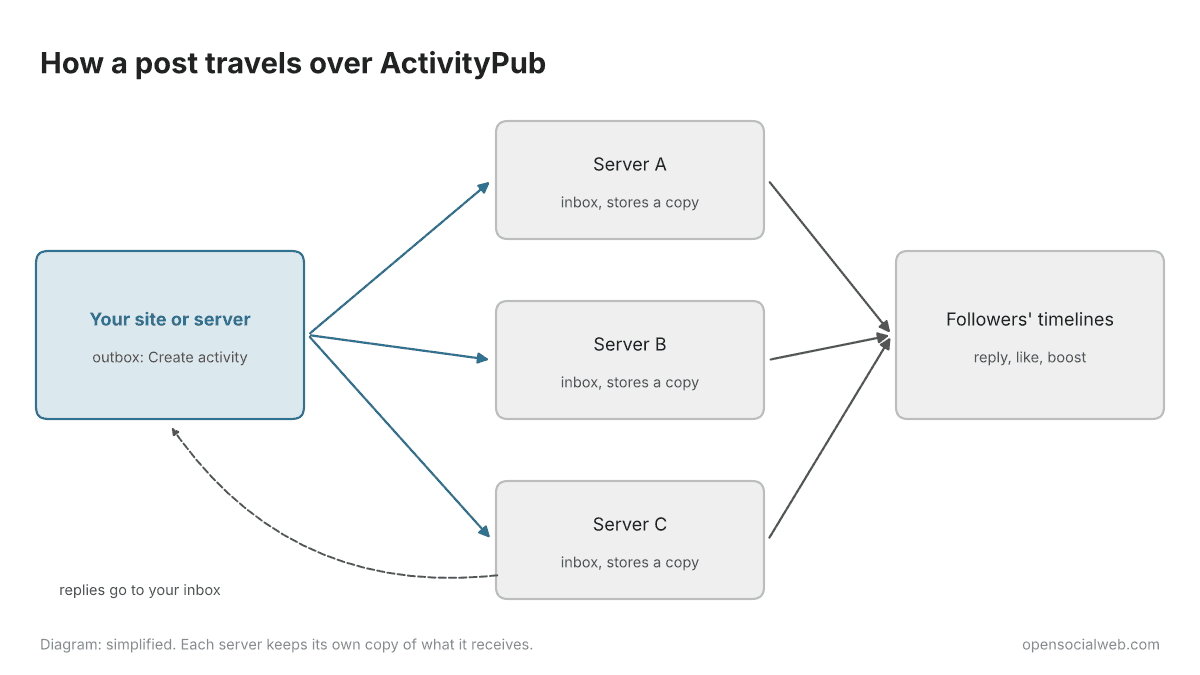
Diagram: Open Social Web, hosted at Pxef.com
Actors, inboxes and outboxes
Everything on ActivityPub is an actor. A Mastodon user is an actor. A WordPress blog with the ActivityPub plugin is an actor, and each of its authors can be one too.
Every actor has two addresses that matter. The outbox is where it publishes things. The inbox is where other servers deliver things to it. When you publish a post, your server wraps it in a small JSON message, a "Create" activity, and sends a copy to the inbox of every server where you have followers. When someone replies, their server sends the reply to your inbox.
That's the core loop. Follows, likes, boosts, edits and deletes are all just activities with different names, delivered the same way.
How a follow finds you
People find fediverse accounts by handle, written like an email address: @name@example.com. Behind the scenes, the other server asks your domain a standard question through a lookup called WebFinger: who is "name" here, and where's their actor profile? Your server answers with a link. From then on, the two servers talk directly.
This is why your own domain matters. If your handle is @you@yoursite.com, your followers are attached to a domain you control. Move hosting, change software, it doesn't matter, as long as the domain answers.
On a Mastodon account at someone else's server, the handle carries their domain instead. Mastodon has an account migration feature that redirects followers to a new account, but your posts don't come with you.
What federation means in practice
Each server keeps its own copy of what it receives. When a Mastodon user follows your blog, their server stores your posts as they arrive. Their users see them in timelines, reply, boost them to their own followers.
A few consequences follow from that design:
- There's no global search or global count. Each server only knows what reached it. Follower numbers and like counts can differ depending on where you look.
- Edits and deletes are requests. Your server sends an "Update" or "Delete" activity. Well-behaved servers apply it, but you're trusting their software.
- Moderation is local. Each server sets its own rules and can block whole other servers, known as defederating. A server that blocks yours won't show your posts to its users.
- Long posts work differently in different apps. Mastodon shows a short preview and a link for blog posts. Other apps show the full article. You don't fully control the presentation.
How a website joins in
There are three common routes, from easiest to most involved.
A plugin on your CMS. WordPress has the official ActivityPub plugin, maintained by Automattic. It turns the site and its authors into fediverse accounts and brings replies back as comments. Our WordPress ActivityPub guide walks through setup. Ghost has added similar features.
A bridge. If your site can't run a plugin, Bridgy Fed can read your RSS feed or your page markup and act as your fediverse account, sending replies back to you as webmentions. It's the usual route for static sites. See Bridgy Fed for Websites.
A separate account. Open a Mastodon account and post links to your articles by hand or with an RSS-to-Mastodon bot. Simplest, but the followers belong to that account, not your domain.
Two small extras worth doing
Even without federating your site, two tiny additions help.
First, verified links. Add rel="me" to a link from your site to your Mastodon profile, and add your site's URL to that profile. Mastodon then shows your website with a green check.
Second, author bylines. Mastodon reads a meta tag, fediverse:creator, in your page's head. When someone shares your article, the preview shows the author's fediverse account underneath, clickable. It looks like this:
<meta name="fediverse:creator" content="@you@example.com">
Where it falls short
ActivityPub is a protocol for delivering messages, and the spec leaves a lot to each implementation. Quote posts, long-form articles and private messages work differently across apps, and the community fills gaps with Fediverse Enhancement Proposals that not every server adopts. Expect rough edges.
It also doesn't connect to Bluesky, which uses a different protocol. For how that one works, read Bluesky and the AT Protocol. For the bigger picture, start at What the Open Social Web Is.